• Guest, To prevent spam, the BrokenLens Forums are not accepting new registrations at this time.

Help

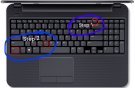
Can you guys show me a screenshot of where i need to find my screenshot in my laptop?
View reply.
 
1489549247252.jpeg
Can you guys show me a screenshot of where i need to find my screenshot in my laptop?
Do step 2 when you're in paint -> https://goo.gl/images/nMzdjG
View reply.
 

Attachments

  • 1489549247252.jpeg
    1489549247252.jpeg
    257 KB · Views: 1
So,i broke my tablet and instead, I am using my laptop. So,how can i copy paste link?
And how do i update my laptop to Window 10? (Stuid question) cause mines Window 7.

Find the link you want to copy. You can copy links from websites, emails, Word documents, and pretty much any other program.
  • Text links in web pages and emails are often underlined and a different color than the surrounding text. Many links are buttons and pictures.
Right-click the link. If the link is a picture, right-clicking the picture will provide the Copy option.
  • If you're on a Mac with a single mouse button, hold Ctrl and click to open the right-click menu.
  • Select the "Copy link" option. When a link is copied, it is sent to your clipboard to be pasted elsewhere. The clipboard can only store a single link at a time. The wording of this option will vary depending on what program you are using. Below are some common examples:
    • Chrome - "Copy link address"
    • Firefox - "Copy Link Location"
    • Internet Explorer - "Copy shortcut"
    • Safari - "Copy Link"
    • Word - "Copy Hyperlink"

    Place your cursor where you want to paste the link. Once your link is copied, you can paste it anywhere you can type. Click to place your cursor wherever you want to paste the link.
    • You can paste the link anywhere you can type, including in emails, Word documents, your browser's address bar, Facebook chats, and more.

Paste the link. There are several ways you can paste your copied link:
  • Right-click wherever your cursor is and select "Paste."
  • Press Ctrl+V (Windows) or ⌘ Cmd+V (Mac).
  • Click the Edit menu (if present) and select "Paste." Not all programs have a visible Edit menu.
View reply.
 

Users Who Are Viewing This Thread (Total: 0, Members: 0, Guests: 0)

Back
Top
