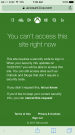
Xbox Live Account Error.

Status
Not open for further replies.
After I click..? What?

If you're saying after I changed my age, this is what comes up:
s3THRGi.jpg
Try making a parent account that will attach to your child account.
It says, "If you have a child account that is not attached to a family account,you can't make changes to or access your Xbox privacy settings."

Maybe try that?
View reply.
 
Thank you both :)

Well I login, my page looks like this:
MeOp4w2.jpg

So I clicked the 'privacy and & online safety' section. Then this came up:
nAjejSX.jpg

I did the same with the other three, trying to figure it out. And the same thing popped up.

It's either I'm just stupid and doing something wrong or it just doesn't want to work for me.

I feel like I'm doing something wrong. ._.
I think this second screenshot is very important

Sorry if it feels like I'm spamming
View reply.
 
BrokenLens
____________________

Some People as I can see are receiving a Message saying "You cannot play online multiplayer through Xbox Live because of how your account is set up. This can be changed in your Privacy and Online safety settings on Xbox.com" when you try joining Brokenlens.
Well in this thread I'm going to be going through a tutorial on how to fix this issue.
1.) Click this link HERE (click the bold 'Here' word)
2.) Login to your Xbox Live account and then click 'Privacy Safety'
3.) Change Everything to 'Everyone' and 'Alllow' in the check boxes on the 'Privacy Tab'
4.) Then go to the 'Xbox 360 Online Safety' tab at the top, and change every check box to 'Allow'.
5.) Click 'save'
6.) Re-load Minecraft/Close it and re-open it.

7.) Enjoy playing on BrokenLens

Yours Truly
~ItsKylie

-Brokenlens Support team-
How to change a child account to a adult? I can't do anthing
View reply.
 
How to change a child account to a adult? I can't do anthing
No, you can't do anything about it. Please create another gmail account to set an adult's fake age, not your real age and then create a new xbox live account if you registered that account from gmail.
View reply.
 
This is why Microsoft absolutely sucks. I hope they know they ruined Minecraft for all the 4-9 year olds who don't have an xbox live account, and if they do, it's a child account and they can't access servers anyway. It's possible that the parents don't know how or aren't willing to fix this either, so there goes a large part on Minecraft's player base. Smart move, Microsoft. (Not)
View reply.
 
This is why Microsoft absolutely sucks. I hope they know they ruined Minecraft for all the 4-9 year olds who don't have an xbox live account, and if they do, it's a child account and they can't access servers anyway. It's possible that the parents don't know how or aren't willing to fix this either, so there goes a large part on Minecraft's player base. Smart move, Microsoft. (Not)
uh I'm Not 4-9 BUT STILL MICROSOFT IS DUMB
View reply.
 
I CNAT FIND PIRVACY SETTINGS ;-;
View reply.
 
@ItsKylie i need help too ;-; it won't let meh in bc of the settings ;-; when I tried to do the steps you where doing, there was a page that made me not get to step 2 ;-; ples help Kylie ;~:
View reply.
 
@ItsKylie this is what pops up whenever I log in to Xbox live in the first step that shu listed
View reply.
 

Attachments

  • IMG_1009.PNG
    IMG_1009.PNG
    126.4 KB · Views: 16
BrokenLens
____________________

Some People as I can see are receiving a Message saying "You cannot play online multiplayer through Xbox Live because of how your account is set up. This can be changed in your Privacy and Online safety settings on Xbox.com" when you try joining Brokenlens.
Well in this thread I'm going to be going through a tutorial on how to fix this issue.
1.) Click this link HERE (click the bold 'Here' word)
2.) Login to your Xbox Live account and then click 'Privacy Safety'
3.) Change Everything to 'Everyone' and 'Alllow' in the check boxes on the 'Privacy Tab'
4.) Then go to the 'Xbox 360 Online Safety' tab at the top, and change every check box to 'Allow'.
5.) Click 'save'
6.) Re-load Minecraft/Close it and re-open it.

7.) Enjoy playing on BrokenLens

Yours Truly
~ItsKylie

-Brokenlens Support team-
My problem is EXACTLY the same and most of the times, it bugs so this doesn't work for some people. What I do is I sign out of Xbox then wait for a few minutes.. (sometimes I restart my device) then sign in again..
View reply.
 
BrokenLens
____________________

Some People as I can see are receiving a Message saying "You cannot play online multiplayer through Xbox Live because of how your account is set up. This can be changed in your Privacy and Online safety settings on Xbox.com" when you try joining Brokenlens.
Well in this thread I'm going to be going through a tutorial on how to fix this issue.
1.) Click this link HERE (click the bold 'Here' word)
2.) Login to your Xbox Live account and then click 'Privacy Safety'
3.) Change Everything to 'Everyone' and 'Alllow' in the check boxes on the 'Privacy Tab'
4.) Then go to the 'Xbox 360 Online Safety' tab at the top, and change every check box to 'Allow'.
5.) Click 'save'
6.) Re-load Minecraft/Close it and re-open it.

7.) Enjoy playing on BrokenLens

Yours Truly
~ItsKylie

-Brokenlens Support team-
I like it
View reply.
 
BrokenLens
____________________

Some People as I can see are receiving a Message saying "You cannot play online multiplayer through Xbox Live because of how your account is set up. This can be changed in your Privacy and Online safety settings on Xbox.com" when you try joining Brokenlens.
Well in this thread I'm going to be going through a tutorial on how to fix this issue.
1.) Click this link HERE (click the bold 'Here' word)
2.) Login to your Xbox Live account and then click 'Privacy Safety'
3.) Change Everything to 'Everyone' and 'Alllow' in the check boxes on the 'Privacy Tab'
4.) Then go to the 'Xbox 360 Online Safety' tab at the top, and change every check box to 'Allow'.
5.) Click 'save'
6.) Re-load Minecraft/Close it and re-open it.

7.) Enjoy playing on BrokenLens

Yours Truly
~ItsKylie

-Brokenlens Support team-
:D
View reply.
 
BrokenLens
____________________

Some People as I can see are receiving a Message saying "You cannot play online multiplayer through Xbox Live because of how your account is set up. This can be changed in your Privacy and Online safety settings on Xbox.com" when you try joining Brokenlens.
Well in this thread I'm going to be going through a tutorial on how to fix this issue.
1.) Click this link HERE (click the bold 'Here' word)
2.) Login to your Xbox Live account and then click 'Privacy Safety'
3.) Change Everything to 'Everyone' and 'Alllow' in the check boxes on the 'Privacy Tab'
4.) Then go to the 'Xbox 360 Online Safety' tab at the top, and change every check box to 'Allow'.
5.) Click 'save'
6.) Re-load Minecraft/Close it and re-open it.

7.) Enjoy playing on BrokenLens

Yours Truly
~ItsKylie

-Brokenlens Support team-
Ty!
View reply.
 
Theres another way to fix it to.. if you that kind of thing ( how you login blah blah blah) all you have to do is logout ur xbox live acc then log in then its fix ._.
View reply.
 
umm this is really late but when that message appeared to me, I only closed minecraft and re-opened it :D
View reply.
 
Status
Not open for further replies.

Users Who Are Viewing This Thread (Total: 0, Members: 0, Guests: 0)

Back
Top