
Navigation
Install the app
How to install the app on iOS
Follow along with the video below to see how to install our site as a web app on your home screen.
Note: This feature may not be available in some browsers.
More options
Style variation
You are using an out of date browser. It may not display this or other websites correctly.
You should upgrade or use an alternative browser.
You should upgrade or use an alternative browser.
Teach Me How?
- Thread starter Vyzcar
- Start date


- Jun 5, 2020
- 2,451
- 36,057
Hey!
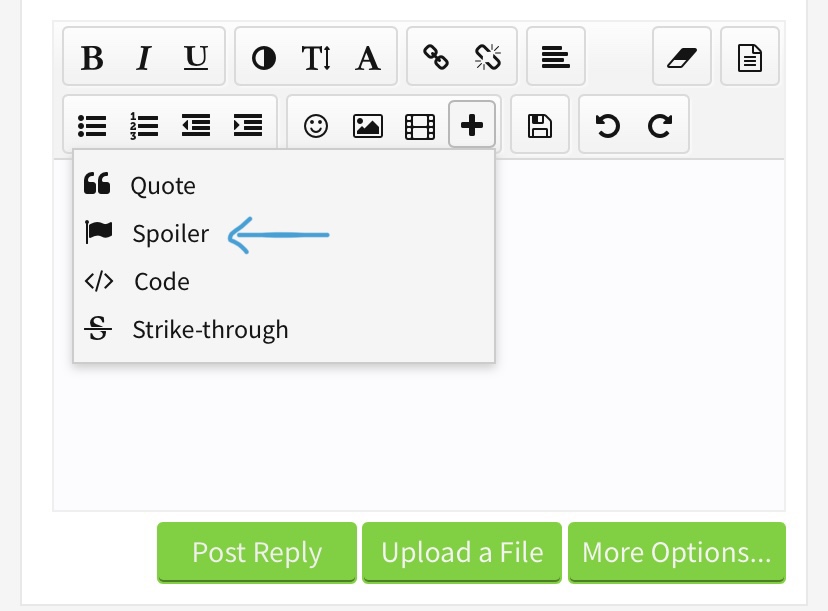
you have to click on the little plus here and then on ‚spoiler‘
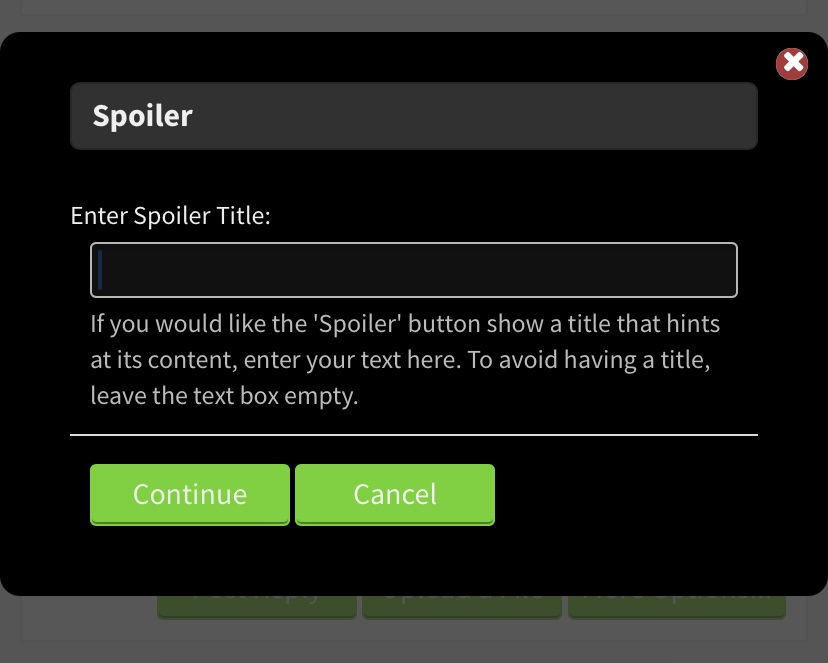
after that, you can enter a title here (if you‘d like your spoiler to have one, else you leave it empty)
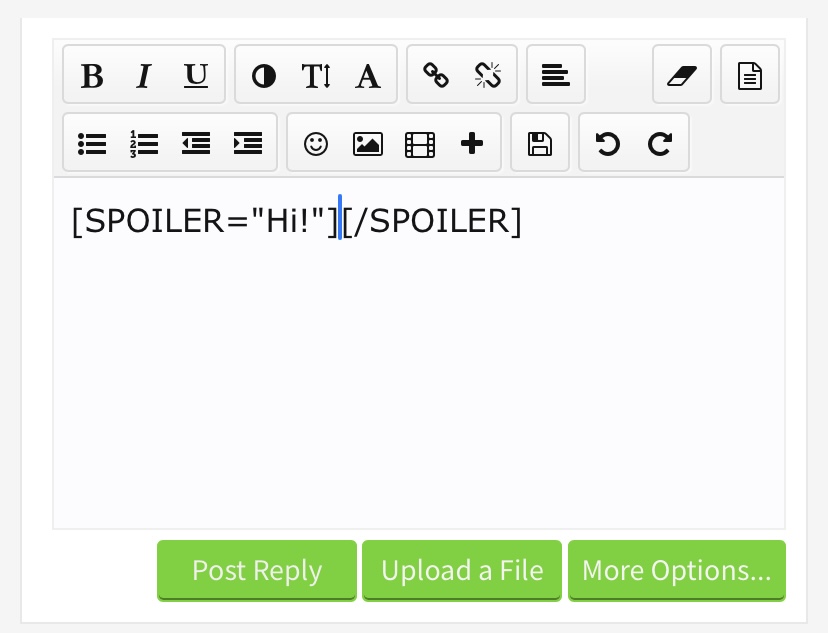
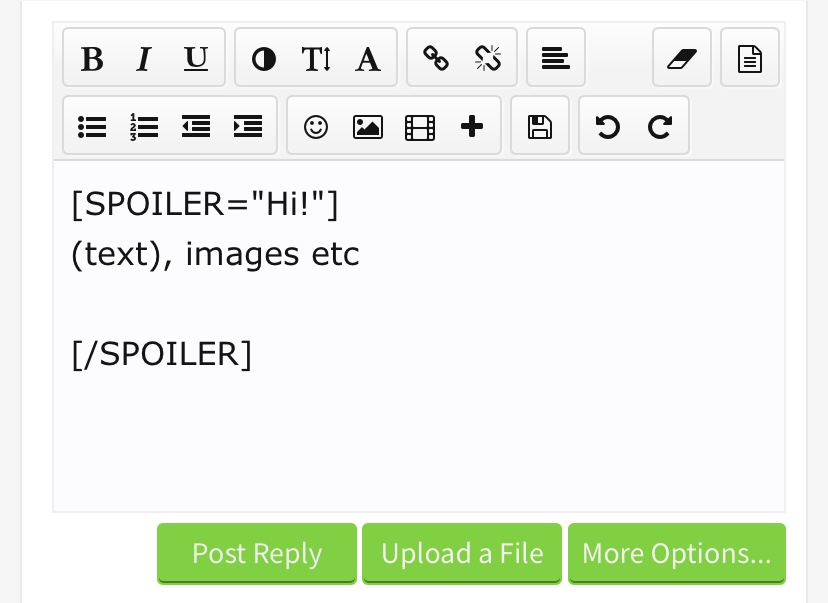
You have to write or paste pictures between the first [spoiler] and the end [/spoiler] - then it will appear in it
View reply.
you have to click on the little plus here and then on ‚spoiler‘
after that, you can enter a title here (if you‘d like your spoiler to have one, else you leave it empty)
You have to write or paste pictures between the first [spoiler] and the end [/spoiler] - then it will appear in it

Vyzcar
Notable Member
- Oct 30, 2021
- 412
- 1,385
- Thread starter
- #3
Hey thanks for explain it, i know the step making spoiler now. But how to paste our pictures?Hey!
View attachment 294237
you have to click on the little plus here and then on ‚spoiler‘
View attachment 294238
after that, you can enter a title here (if you‘d like your spoiler to have one, else you leave it empty)
View attachment 294239
View attachment 294240
You have to write or paste pictures between the first [spoiler] and the end [/spoiler] - then it will appear in it
View attachment 294241
- Jun 5, 2020
- 2,451
- 36,057
That mainly depends on the device you’re using but there usually is an option called ‚copy picture‘ or something - after you copied it you can just paste it here with either ctrl+v or on mobile with the paste option - I don‘t know about android but this is what it looks like on iOS:Hey thanks for explain it, i know the step making spoiler now. But how to paste our pictures?
Vyzcar
Notable Member
- Oct 30, 2021
- 412
- 1,385
- Thread starter
- #6
WOAHH, I CAN DO THAT!Ignore this i just try copy it :
View attachment 294249
Thanks for explaining, you're a good teacher.

- Jun 5, 2020
- 2,451
- 36,057
Yep! It just has to be between the [spoiler] and the [/spoiler] - everything you put between those will appear in the spoilerWhat about the URL link?
Can it do like that too?
- Jun 5, 2020
- 2,451
- 36,057
That depends on the app you‘re using - youtube for example has a share function where you can copy the link and either paste it directly here or with pasting it here:How to copy our URL link for Images URL?
for image links (or gif links) it works the same just that you have to click on this button:
Vyzcar
Notable Member
- Oct 30, 2021
- 412
- 1,385
- Thread starter
- #11
How to get our URL link from our images?That depends on the app you‘re using - youtube for example has a share function where you can copy the link and either paste it directly here or with pasting it here:
View attachment 294262
View attachment 294263
for image links (or gif links) it works the same just that you have to click on this button:
View attachment 294264
- Jun 5, 2020
- 2,451
- 36,057
what do you mean?How to get our URL link from our images?

- Jun 5, 2020
- 2,451
- 36,057
It’s okay xD I‘m glad I could help you - let me know if you have any more questions ^^Sorry im so confused right now, but now know how to make a spoiler with an images inside of it. Thanks, and sorry make you confused too
Also if you meant getting an URL link from pictures saved in your photo library on your device I don’t think that’s possible and there are way easier ways to upload those pictures - with the upload a file button you can directly choose them from your photo library

SecretStash99
Notable Member
- Mar 15, 2021
- 4,792
- 23,451
Prooppy Angi 
View reply.
Vyzcar
Notable Member
- Oct 30, 2021
- 412
- 1,385
- Thread starter
- #17
I have more questions.let me know if you have any more questions ^^
How we setting our profile page like this :
This just an example..
Vyzcar was last seen: 1 minutes ago
But when it default setting like this :
Vyzcar was last seen: Viewing member profile Vyzcar, A moment ago
How to setting like that ( just last seen: 1 minutes ago, not viewing the current our activity ).
Thank you for your helps.


- Dec 19, 2016
- 23,169
- 234,950
personal details->privacyI have more questions.
How we setting our profile page like this :
This just an example..
Vyzcar was last seen: 1 minutes ago
But when it default setting like this :
Vyzcar was last seen: Viewing member profile Vyzcar, A moment ago
How to setting like that ( just last seen: 1 minutes ago, not viewing the current our activity ).
Thank you for your helps.
- Dec 19, 2016
- 23,169
- 234,950
yep, uncheck the boxes that you don't want to have shown on your profileThe show your currently activity turn in off?