stephhenie
New Member
- Jan 17, 2021
- 7
- 48
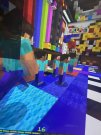
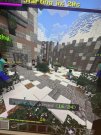
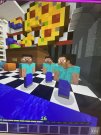
hi so every game or two, most my blocks and all my characters turn into steve skins. i have tried turning off screen animations, deleting and redownloading minecraft and restarting. pls help?

Follow along with the video below to see how to install our site as a web app on your home screen.
Note: This feature may not be available in some browsers.

hi so every game or two, most my blocks and all my characters turn into steve skins. i have tried turning off screen animations, deleting and redownloading minecraft and restarting. pls help?
Try removing texture packs.this also happens in hide and seek !
i dont use texture packsTry removing texture packs.
Always works for me!
 (
(
probably because of the update of 1.16.210?hi so every game or two, most my blocks and all my characters turn into steve skins. i have tried turning off screen animations, deleting and redownloading minecraft and restarting. pls help?
ah maybe、some others r having sme problem too :3probably because of the update of 1.16.210?

This is just like the pink player bug, but the pinks are replaced with Steves now.hi so every game or two, most my blocks and all my characters turn into steve skins. i have tried turning off screen animations, deleting and redownloading minecraft and restarting. pls help?

WAIT THERES AN UPDATE I HAD NO IDEA-probably because of the update of 1.16.210?


oh my gawdAll I see are Steves chasing Steves in Hide and seek now :'0
And chasing with them with Steve sword-All I see are Steves chasing Steves in Hide and seek now :'0
I don’t get the meme?
ah thank you! i have no clue how to downgrade the update thing so ill just stick with what i got. but again thank you <3It has to do with how the game loads player models and npcs as part of the RenderDragon update. Sometimes the game on newer builds gets confused after a while about how things work which is why it just replaces things with Steve models as of 1.16.201. This is something that Microsoft and Mojang are working on for Bedrock Edition as they are continuing to work on stability for RenderDragon which will allow for features within newer graphics cards and next generation consoles to be used.
You can resolve this issue if you downgrade your game installation down to Minecraft 1.16.40 although that doesn't work for many types of devices and can lead to compatibility problems with worlds and certain resource packs.

You can do so if you are on Windows 10 by using a nifty little program called McLauncher that is available for download on github. I'm not too sure about other platforms though.ah thank you! i have no clue how to downgrade the update thing so ill just stick with what i got. but again thank you <3