• Guest, To prevent spam, the BrokenLens Forums are not accepting new registrations at this time.

Signature Problem

BopI

Notable Member
Emerald Member
Joined
Sep 15, 2019
Messages
9,638
Reaction score
39,282
C3561E45-0DFF-41B9-883D-38C6409F68FC.png
I’m new here, and I have problems, okay?
So I’m trying to upload this photo
As my signature.
How dew u dew that? I saw another person do it. Specifically @HannahZard

 
You press the button that looks like a small photo of a mountain and a sun on it. Then, enter the URL of the image you want to use. Sadly, I don’t know how to find the image URL tho, as this is as far as I can help you :confused:
View reply.
 

Attachments

  • 05FD98BC-7062-4B82-9CF8-047B20DAA280.png
    05FD98BC-7062-4B82-9CF8-047B20DAA280.png
    253.6 KB · Views: 9
  • CE4DB523-4E22-4A0B-AB9B-0CA74BB791A1.png
    CE4DB523-4E22-4A0B-AB9B-0CA74BB791A1.png
    493 KB · Views: 9
no, one in a photo album, not online
View reply.
 
My friend drew it for me
View reply.
 
On computer? Or iPad?
View reply.
 
01B083A6-8D82-4D9C-800A-68E0C1F47076.png Thx
View reply.
 
Well, you posted the image online here, so. ;p

1. Open the image you posted here in a new tab. (Right click on pc, hold down on image for tablet/phone)
1.png

2. Copy the link address at the top of the page.
2.png

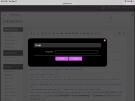
3. Navigate to your signature page.
3.png

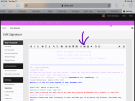
4. Click on the indicated button.
4.png

5. Paste the link in the box, insert, and then save your changes. All done!
5.png
View reply.
 
yaaaaay thank you srbenjys :3
View reply.
 
i’m now tempted to just yank a screenshot out of my camera roll i got off of a twitch stream to put as mine xD
View reply.
 

Users Who Are Viewing This Thread (Total: 0, Members: 0, Guests: 0)

Back
Top