
Navigation
Install the app
How to install the app on iOS
Follow along with the video below to see how to install our site as a web app on your home screen.
Note: This feature may not be available in some browsers.
More options
Style variation
You are using an out of date browser. It may not display this or other websites correctly.
You should upgrade or use an alternative browser.
You should upgrade or use an alternative browser.
Screen recording and posting :D
- Thread starter Charm
- Start date

- Nov 16, 2017
- 24,454
- 172,039
Maybe you could try uploading the video to streamable, sendvid or YT and post the links here? 
View reply.

- Aug 6, 2020
- 104
- 1,253
- Thread starter
- #3
Omg I’m so dumb- I literally forgot LMAO. Thank you <33Maybe you could try uploading the video to streamable, sendvid or YT and post the links here?

Brittney26
Notable Member
- Jul 2, 2020
- 1,223
- 19,433
oooooo i wanna seeeeeeeeee
View reply.
- Aug 6, 2020
- 104
- 1,253
- Thread starter
- #5
XD soonoooooo i wanna seeeeeeeeee


- Aug 9, 2020
- 1,395
- 19,420
If you are using OBS Studio (Great program but things can be a bit tricky), I might be able to help with optimal settings to make everything really nice. There also are ways to make it so other applications don't pick up in your recording so you can listen to music in the background and just record the audio from your game but that gets a bit technical.
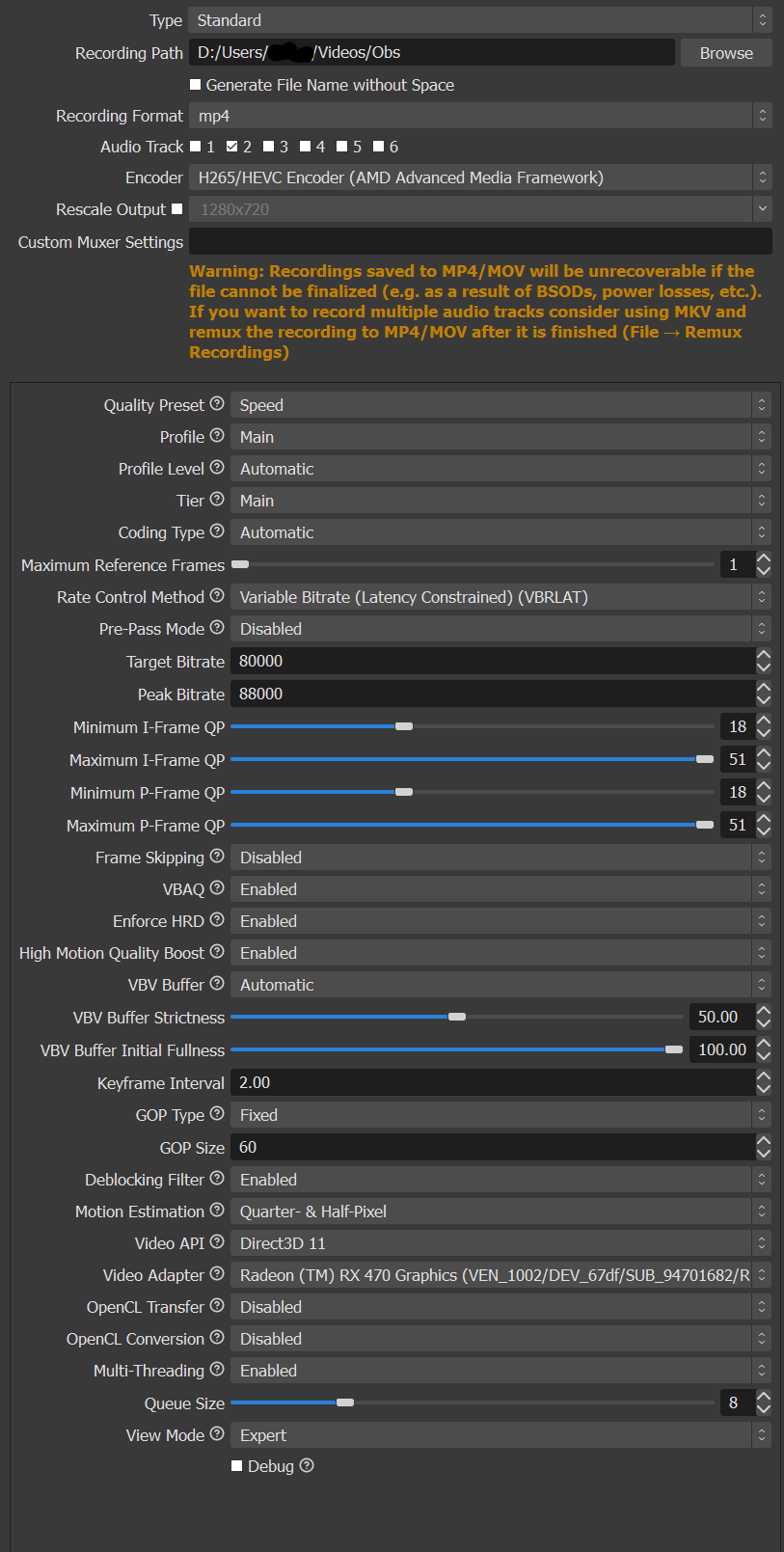
Here are some of my recording output settings for OBS:
View reply.
Here are some of my recording output settings for OBS:
- Aug 6, 2020
- 104
- 1,253
- Thread starter
- #7
Omg thank youu!!! <3 I’ll try to understand :’)If you are using OBS Studio (Great program but things can be a bit tricky), I might be able to help with optimal settings to make everything really nice. There also are ways to make it so other applications don't pick up in your recording so you can listen to music in the background and just record the audio from your game but that gets a bit technical.
Here are some of my recording output settings for OBS:
View attachment 251584
- Aug 9, 2020
- 1,395
- 19,420
Basically the most important setting to check is your encoder. What you would want to set it to depends on if you have a dedicated graphics card in your computer. Many systems that are better for gaming have a dedicated gpu so if that is the case with your system, I would set the encoder to an H.265 or NVENC encoder depending on your graphics card.
If you don't have a graphics card, I would just use x264 or x265 from your main CPU and adjust your settings accordingly.
Afterwards, I would mainly just adjust the video bit-rate based off storage and how fast your computer is.
View reply.
If you don't have a graphics card, I would just use x264 or x265 from your main CPU and adjust your settings accordingly.
Afterwards, I would mainly just adjust the video bit-rate based off storage and how fast your computer is.

GnomeSaiyan2
Notable Member
- May 20, 2020
- 1,082
- 18,241
oof watch out we got a bigbrain hereBasically the most important setting to check is your encoder. What you would want to set it to depends on if you have a dedicated graphics card in your computer. Many systems that are better for gaming have a dedicated gpu so if that is the case with your system, I would set the encoder to an H.265 or NVENC encoder depending on your graphics card.
If you don't have a graphics card, I would just use x264 or x265 from your main CPU and adjust your settings accordingly.
Afterwards, I would mainly just adjust the video bit-rate based off storage and how fast your computer is.
- Aug 6, 2020
- 104
- 1,253
- Thread starter
- #10
Can you put in simple terms? TwTBasically the most important setting to check is your encoder. What you would want to set it to depends on if you have a dedicated graphics card in your computer. Many systems that are better for gaming have a dedicated gpu so if that is the case with your system, I would set the encoder to an H.265 or NVENC encoder depending on your graphics card.
If you don't have a graphics card, I would just use x264 or x265 from your main CPU and adjust your settings accordingly.
Afterwards, I would mainly just adjust the video bit-rate based off storage and how fast your computer is.
GnomeSaiyan2
Notable Member
- May 20, 2020
- 1,082
- 18,241
ikrCan you put in simple terms? TwT
- Aug 6, 2020
- 104
- 1,253
- Thread starter
- #12
I don’t understand :’D am I just dumb or?
GnomeSaiyan2
Notable Member
- May 20, 2020
- 1,082
- 18,241
I think he's just too bigbrain for us-
View reply.
- Aug 6, 2020
- 104
- 1,253
- Thread starter
- #14
LMAOO my IQ is 0I think he's just too bigbrain for us-
GnomeSaiyan2
Notable Member
- May 20, 2020
- 1,082
- 18,241
bruh same tho-LMAOO my IQ is 0
- Aug 6, 2020
- 104
- 1,253
- Thread starter
- #16
Omgg I thought I was the only one who didn’t understand-I think he's just too bigbrain for us-
GnomeSaiyan2
Notable Member
- May 20, 2020
- 1,082
- 18,241
Pssh were just the only ones who'll admit to being dumb as a rockOmgg I thought I was the only one who didn’t understand-
- Aug 6, 2020
- 104
- 1,253
- Thread starter
- #18
Omg yess. I’m actually dumber than a rock. LMAOPssh were just the only ones who'll admit to being dumb as a rock
GnomeSaiyan2
Notable Member
- May 20, 2020
- 1,082
- 18,241
when a non living object is smarter than two humans-Omg yess. I’m actually dumber than a rock. LMAO
GnomeSaiyan2
Notable Member
- May 20, 2020
- 1,082
- 18,241
what a mood
View reply.