
Navigation
Install the app
How to install the app on iOS
Follow along with the video below to see how to install our site as a web app on your home screen.
Note: This feature may not be available in some browsers.
More options
Style variation
You are using an out of date browser. It may not display this or other websites correctly.
You should upgrade or use an alternative browser.
You should upgrade or use an alternative browser.
Question
- Thread starter Jacob731_
- Start date
- Status
- Not open for further replies.


Ray_Palmer_Atom
Notable Member
- May 16, 2016
- 4,542
- 107,022
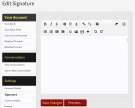
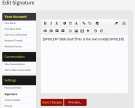
- Firstly, go to the "edit signature" page (as you know)
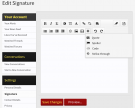
- Click on the "+" button, which is the 4th icon from the right, in the second row, and it will open a drop-down menu
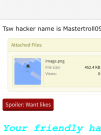
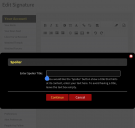
- Select "spoiler" and a box will pop up, in which you can name your spoiler. (For example the name of the spoiler in your screenshot is "want likes"
- Now you can type whatever text you want to appear when someone opens the spoiler

Attachments

Pixel
Notable Member
- Jul 17, 2016
- 4,217
- 105,433
Each of the attached screenshots corresponds to 1 of the steps. Hope this helps you
- Firstly, go to the "edit signature" page (as you know)
- Click on the "+" button, which is the 4th icon from the right, in the second row, and it will open a drop-down menu
- Select "spoiler" and a box will pop up, in which you can name your spoiler. (For example the name of the spoiler in your screenshot is "want likes"
- Now you can type whatever text you want to appear when someone opens the spoiler
THANK YOU MR RAY!Each of the attached screenshots corresponds to 1 of the steps. Hope this helps you
- Firstly, go to the "edit signature" page (as you know)
- Click on the "+" button, which is the 4th icon from the right, in the second row, and it will open a drop-down menu
- Select "spoiler" and a box will pop up, in which you can name your spoiler. (For example the name of the spoiler in your screenshot is "want likes"
- Now you can type whatever text you want to appear when someone opens the spoiler
xD- Status
- Not open for further replies.