

HazardTheDutchAD
Muted
- Sep 24, 2016
- 7,217
- 21,922
Hey Hazard here again.
(Ino89777)
So what's this forum post about?
PURCHASING Items to customise your character!
here you will learn:
Any Minigame Lobby
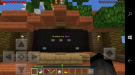
when you walk up to the menu you will see an interactive screen pop up with buttons. You can interact with this menu by using the buttons.
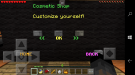
to customize your character you press the middle button labelled OK.
This will take you to a menu saying "Walking Particles" you can use the left and right buttons (not home and back) to choose what to customise.
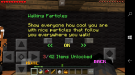
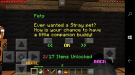
pets,walking particle's,death sounds and awesome MagicStaff particle effect's.
when you find what you want to customise another option will appear use the arrows to select what you would like to buy. In my case I wanted to buy a pet pig.
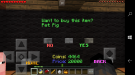
you will be asked if you are sure you want to purchase select yes and CONGRATS you have now purchased your pet!
to use your pet go back into the pets menu find your purchase and enable your pet. This is the same method for death sounds,magic staff particles and walking particles.
thankyou for reading this forum post. If you liked this post please like or comment below if you don't understand this post please contact me.
all images below are to use as a guide to show you what and how this menu looks like
(Ino89777)
So what's this forum post about?
PURCHASING Items to customise your character!
here you will learn:
- How to use the BrokenLens Menu
- How to purchase items to customise your character.
Any Minigame Lobby
when you walk up to the menu you will see an interactive screen pop up with buttons. You can interact with this menu by using the buttons.
to customize your character you press the middle button labelled OK.
This will take you to a menu saying "Walking Particles" you can use the left and right buttons (not home and back) to choose what to customise.
pets,walking particle's,death sounds and awesome MagicStaff particle effect's.
when you find what you want to customise another option will appear use the arrows to select what you would like to buy. In my case I wanted to buy a pet pig.
you will be asked if you are sure you want to purchase select yes and CONGRATS you have now purchased your pet!
to use your pet go back into the pets menu find your purchase and enable your pet. This is the same method for death sounds,magic staff particles and walking particles.
thankyou for reading this forum post. If you liked this post please like or comment below if you don't understand this post please contact me.
all images below are to use as a guide to show you what and how this menu looks like
Attachments
Last edited:


