

- Apr 9, 2017
- 355
- 2,205
Hello, today I will tell you how to set up your profile page for new members, and I will tell how to make your signature, how to change your profile picture, and WAYYY more! Postings, recent activity, etc. Lets get started!
First, I will tell how to CHANGE YOUR PROFILE PICTURE. First, go to your profile page by tapping on your account/ign. Next, tap your profile picture. Now, your screen should look like this:
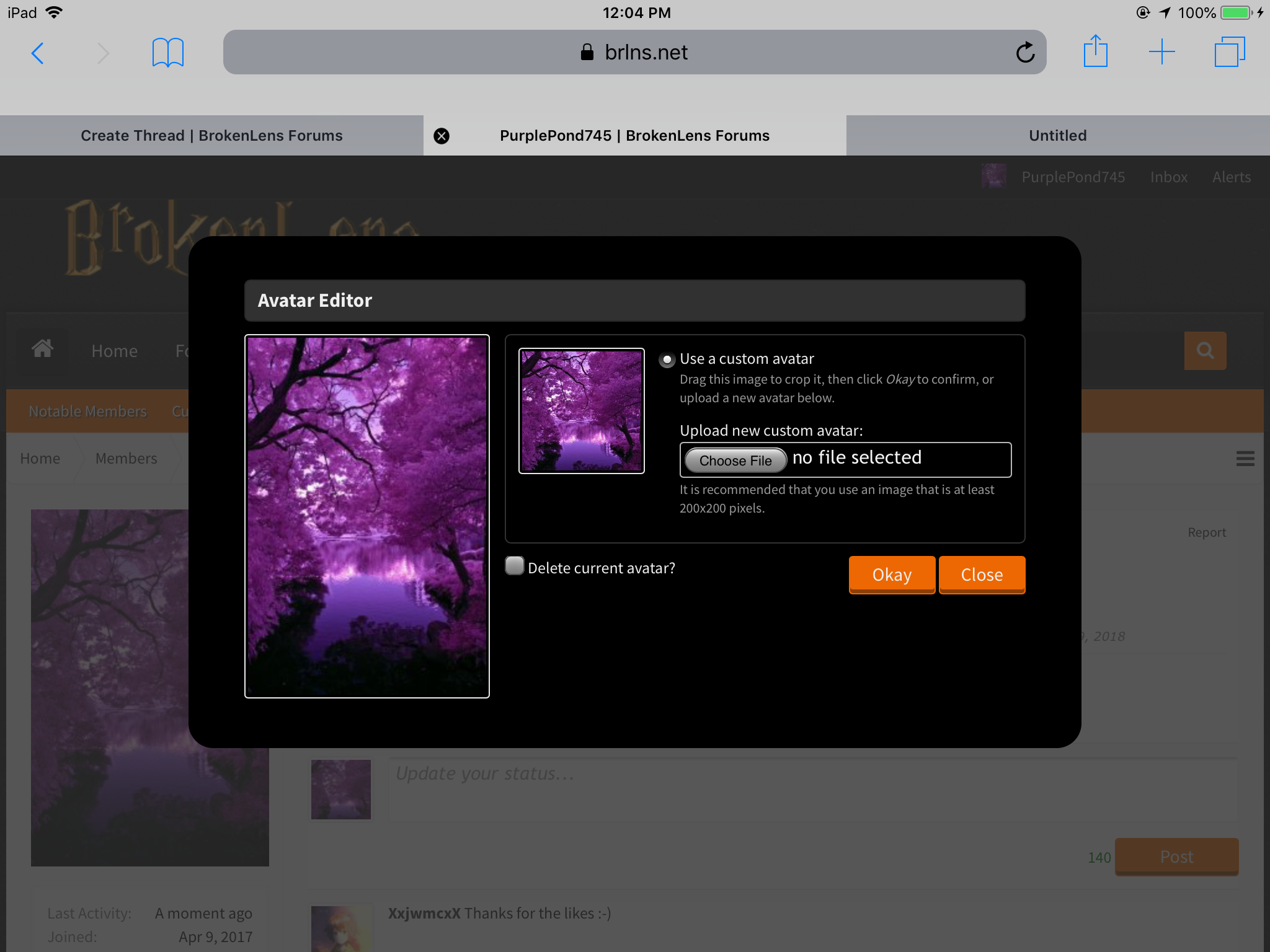
But, your name isn’t PurplePond745 xD now, go to choose file. Next, type photo library and it should bring up photos you can choose from. Tap the photo you want and it can ONLY be 200x200 pixels. Sometimes, it may say your avatar is too big. If you were successful to get your photo, great job! It should say Upload Created Successfully at the top when you select the photo. Press okay if you want that avatar. You can change your avatar anytime!
Second, I will tell you about FOLLOWERS. I usually like to follow my friends, but you don’t have to of course! If you go to your profile page, scroll down and look to the left. There will be a followers square and following square. Now, I will tell you HOW to follow people. I will get an example. @_PineappleDeath_ When you tap on another member’s name, it will be in a square-ish rectangle shape. But I’m using pine for the example. When I tap on her, it looks like this:
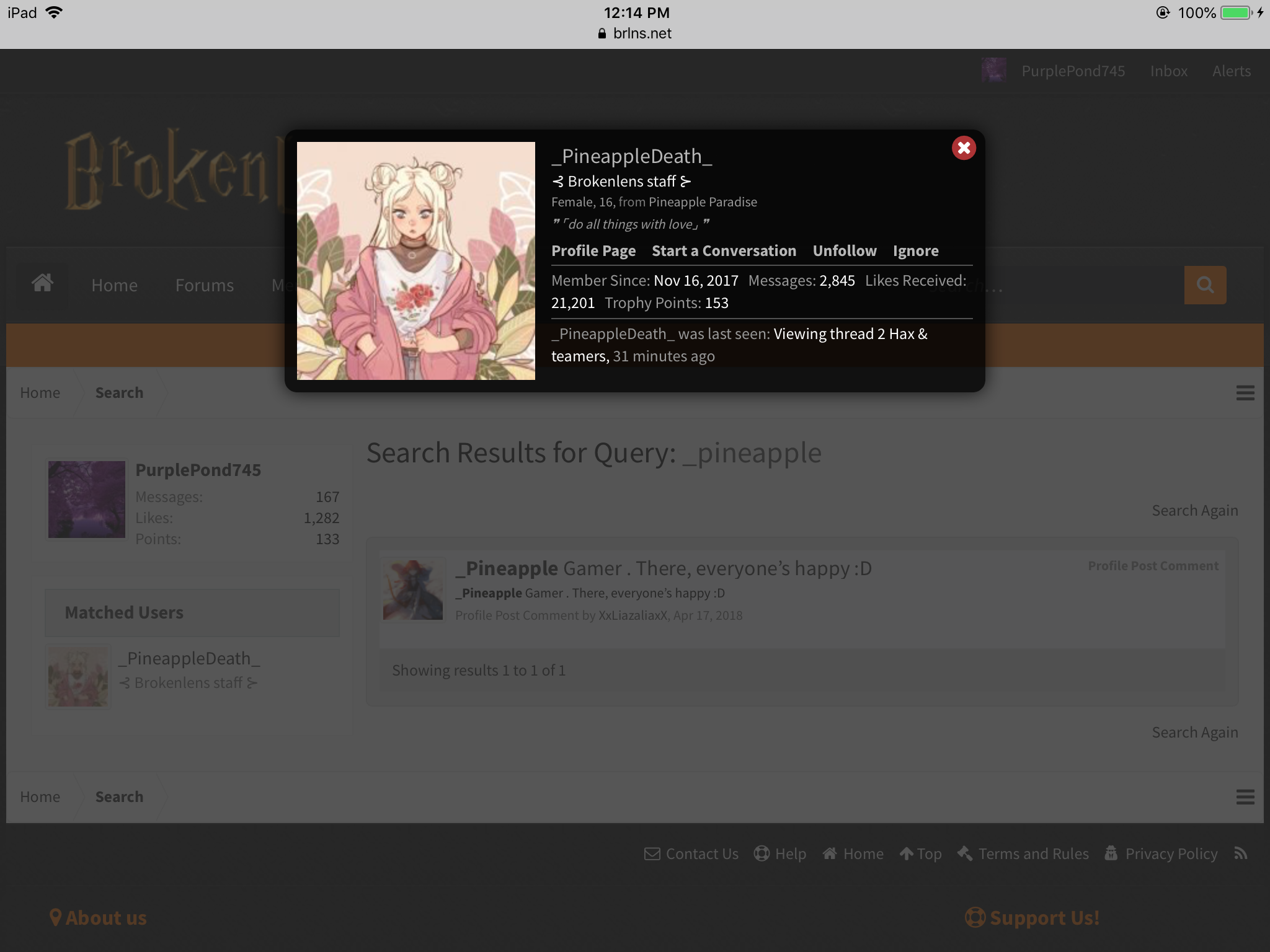 Tap unfollow if you want to unfollow a player. But I don’t want to unfriend Pine because she’s a friend xD. But you can follow and unfollow people using that. OR you can go to their profile page and tap follow on the top right corner of that member’s profile page. It will say “_______ is following you.” Or “_______ is not following you.” Instead, it is in gray below it. But it is creepy.. (you get it? XD cuz someone is following you and.. ok xD)
Third, I will tell about your STATUS. You can update your status, but you have a limit, or a number of characters so you don’t have a long status! You can reply to people when they say something on your profile page by tapping or clicking on the comment button located to the right. Be nice! And if you have an inappropriate status, staff can delete your status. So be appropriate and be kind! If you are done writing your status, tap or click on Post in white with orange located to the right. You have 140 characters, and spaces count as one!
Fourth, I will tell about your SIGNATURE. Signatures can be very long, but I like mine medium and an introduce yourself type thingy, but you can make yours however you want it! If you talk or reply on a thread, there will be a dark line, not too dark that separates your post and signature. Some people don’t have signatures, and it’s okay. If you don’t have a signature and want one, read on! So go to your profile page for the first thing. On the top RIGHT corner, there will be your avatar to the left side of your name, inbox, then alerts to the right. Tap on your name. There should be personal details, news feed, etc. when you tap it. Tap on signature, which is on the left side and is second. And there ya go! If you want to color it, do you see a half filled circle to the left side of the T with an arrow? Tap on it! It will give you a color pad. I would recommend to use dark colors so people can read it easily, and only a little bright colors, but it’s up to you!
Fifth, I will tell about RECENT ACTIVITY. Your recent activity shows the time and date of when you post, or like something, especially on a post. Or when someone replies to a comment you made. Hopefully get the point! Now, I will show you HOW you can see your recent activity. So, go to your profile page. See profile posts? To the right of it, it will say recent activity. Tap or click on it! I forgot to mention it also says that you change your new avatar too, or have a new one. There will be a show older items sentence when you look at the bottom of the list. Only if you have many recent activities!
Sixth, I will tell about your INBOX. Your inbox are CONVERSATIONS, which allow you to talk privately to ONLY some chosen player(s). You can choose up to five people to talk to. I will tell you how to OPEN it. Tap on inbox, which is in the middle between your name to the left, and alerts to the right. It will either say “you have no recent conversations” or the recent conversation you were talking to someone about. It will say show all to the bottom left corner of the box or Start a New Conversation on the bottom right corner of the box. Now, to create one, tap or click on Start a New Conversation. It will say Participants, which are the members, or member you are talking to. It says to separate names with a comma. Then you can write your message to that member or members! It can be a group conversation if you have more than one member. Enjoy!
Seventh, I will tell about your ALERTS. Alerts is to the right of inbox. You can go to your account settings, by tapping your profile page avatar and name to go. You can be alerted when you have a new follower, when you get a like on a post, and more! You can choose the way you want your account set up. If you somehow get an alert, there will be a red box on it with a number. There are many spam likers! Tap alert preferences and there will be a long list that can help you with alerts and how you want it set up. And there is a show all button, which obviously, shows all. XD
Eighth, I will tell about your POSTINGS. You can find all your content, or posts by tapping or clicking the button located at the bottom. There is also a find all threads button. You can get to the postings by first, going to your profile page. It is beside information, to the left of it, and to the right of recent activity. There will be a list, though. But you can always see more!
9th, I will tell about your INFORMATION. (Before we get started I broke the color pallet xD I can only have this color). There will be an ABOUT word, and there will be gender, location, minecraft username, and more! You can always change it by going to your account settings, anytime. There is an INTERACT word below your ABOUT information, and the INTERACT can be content, and more. There are a lot of discord ones! Below the INTERACT, is your signature. It can be written in or just blank. To get to it, go to your profile page. Information is located to the left of all 3 sortings, profile posts, recent activity, postings, then information TO THE FARTHEST LEFT.
10th and last, I will tell about your STATISTICS. I just made up that word, because it actually doesn’t have a name. When you go to your profile page, look under your avatar. There will be a white box saying last activity, joined, messages, likes received, and trophy points. This paragraph will be long. Your last activity will have a number of minutes, like 11 minutes, 12 minutes, etc. hours, months, and etc. If you’re new, you may not have a last activity because you may joined today, yesterday, the day before, and so on. Next is the joined one. You may have a specific DATE on it, which tells when you created your account and joined on the brokenlens forums. It may say Sunday, Monday, Tuesday, etc. but a couple days later, it will change and say a date (most likely). You will have a specific number of messages. 1, 2, 3, 4, And even higher up! You may also have 0 if you’re new. Many have hundreds, thousands, and 10 thousands! The person with the most messages is @ssunsett (good job ssun xD)! Likes recieved will also be a specific number, and usually, your likes will have a bigger number than your messages. The next thing is Trophy Points, you can have up to 153 trophy points! I only have 133 :/. To look at your trophy points and see how many you have, tap the trophy points number. It will bring you to a different page and will tell the title of your achievement, and how many points you’ve earned. To see all available trophies, tap the orange button the bottom left of that box. You can see what you need to do in order to get them! I recommend getting the easy ones first, though, but of course, it’s up to you!
OTHER : There are other buttons, but I just told you the most used ones, and important. But there is another button, which is the report button. You can report yourself! To report other players, go to their profile page and tap the report button or click. You have to say the reason!
I told you a lot about profile pages, especially for new members. I hope you guys learned something! Thanks for reading this, have a fantastic day!
(@vertx @WarriorGirl3333 @_PineappleDeath_ @Woona @XxLiazaliaxX @Laura_Aria @edwjusti @DrollTheTroll @DarkRainbows @ssunsett @Aypi @ender_bintang @Woona )
First, I will tell how to CHANGE YOUR PROFILE PICTURE. First, go to your profile page by tapping on your account/ign. Next, tap your profile picture. Now, your screen should look like this:
But, your name isn’t PurplePond745 xD now, go to choose file. Next, type photo library and it should bring up photos you can choose from. Tap the photo you want and it can ONLY be 200x200 pixels. Sometimes, it may say your avatar is too big. If you were successful to get your photo, great job! It should say Upload Created Successfully at the top when you select the photo. Press okay if you want that avatar. You can change your avatar anytime!
Second, I will tell you about FOLLOWERS. I usually like to follow my friends, but you don’t have to of course! If you go to your profile page, scroll down and look to the left. There will be a followers square and following square. Now, I will tell you HOW to follow people. I will get an example. @_PineappleDeath_ When you tap on another member’s name, it will be in a square-ish rectangle shape. But I’m using pine for the example. When I tap on her, it looks like this:
Third, I will tell about your STATUS. You can update your status, but you have a limit, or a number of characters so you don’t have a long status! You can reply to people when they say something on your profile page by tapping or clicking on the comment button located to the right. Be nice! And if you have an inappropriate status, staff can delete your status. So be appropriate and be kind! If you are done writing your status, tap or click on Post in white with orange located to the right. You have 140 characters, and spaces count as one!
Fourth, I will tell about your SIGNATURE. Signatures can be very long, but I like mine medium and an introduce yourself type thingy, but you can make yours however you want it!
If you talk or reply on a thread, there will be a dark line, not too dark that separates your post and signature. Some people don’t have signatures, and it’s okay. If you don’t have a signature and want one, read on! So go to your profile page for the first thing. On the top RIGHT corner, there will be your avatar to the left side of your name, inbox, then alerts to the right. Tap on your name. There should be personal details, news feed, etc. when you tap it. Tap on signature, which is on the left side and is second. And there ya go! If you want to color it, do you see a half filled circle to the left side of the T with an arrow? Tap on it! It will give you a color pad. I would recommend to use dark colors so people can read it easily, and only a little bright colors, but it’s up to you! Fifth, I will tell about RECENT ACTIVITY. Your recent activity shows the time and date of when you post, or like something, especially on a post. Or when someone replies to a comment you made. Hopefully get the point!
Now, I will show you HOW you can see your recent activity. So, go to your profile page. See profile posts? To the right of it, it will say recent activity. Tap or click on it! I forgot to mention it also says that you change your new avatar too, or have a new one. There will be a show older items sentence when you look at the bottom of the list. Only if you have many recent activities! Sixth, I will tell about your INBOX. Your inbox are CONVERSATIONS, which allow you to talk privately to ONLY some chosen player(s). You can choose up to five people to talk to. I will tell you how to OPEN it. Tap on inbox, which is in the middle between your name to the left, and alerts to the right. It will either say “you have no recent conversations” or the recent conversation you were talking to someone about. It will say show all to the bottom left corner of the box or Start a New Conversation on the bottom right corner of the box. Now, to create one, tap or click on Start a New Conversation. It will say Participants, which are the members, or member you are talking to. It says to separate names with a comma. Then you can write your message to that member or members! It can be a group conversation if you have more than one member. Enjoy!
Seventh, I will tell about your ALERTS. Alerts is to the right of inbox. You can go to your account settings, by tapping your profile page avatar and name to go. You can be alerted when you have a new follower, when you get a like on a post, and more! You can choose the way you want your account set up. If you somehow get an alert, there will be a red box on it with a number. There are many spam likers! Tap alert preferences and there will be a long list that can help you with alerts and how you want it set up. And there is a show all button, which obviously, shows all. XD
Eighth, I will tell about your POSTINGS. You can find all your content, or posts by tapping or clicking the button located at the bottom. There is also a find all threads button. You can get to the postings by first, going to your profile page. It is beside information, to the left of it, and to the right of recent activity. There will be a list, though. But you can always see more!
9th, I will tell about your INFORMATION. (Before we get started I broke the color pallet xD I can only have this color). There will be an ABOUT word, and there will be gender, location, minecraft username, and more! You can always change it by going to your account settings, anytime. There is an INTERACT word below your ABOUT information, and the INTERACT can be content, and more. There are a lot of discord ones! Below the INTERACT, is your signature. It can be written in or just blank. To get to it, go to your profile page. Information is located to the left of all 3 sortings, profile posts, recent activity, postings, then information TO THE FARTHEST LEFT.
10th and last, I will tell about your STATISTICS. I just made up that word, because it actually doesn’t have a name. When you go to your profile page, look under your avatar. There will be a white box saying last activity, joined, messages, likes received, and trophy points. This paragraph will be long. Your last activity will have a number of minutes, like 11 minutes, 12 minutes, etc. hours, months, and etc. If you’re new, you may not have a last activity because you may joined today, yesterday, the day before, and so on. Next is the joined one. You may have a specific DATE on it, which tells when you created your account and joined on the brokenlens forums. It may say Sunday, Monday, Tuesday, etc. but a couple days later, it will change and say a date (most likely). You will have a specific number of messages. 1, 2, 3, 4, And even higher up! You may also have 0 if you’re new. Many have hundreds, thousands, and 10 thousands! The person with the most messages is @ssunsett (good job ssun xD)! Likes recieved will also be a specific number, and usually, your likes will have a bigger number than your messages. The next thing is Trophy Points, you can have up to 153 trophy points! I only have 133 :/. To look at your trophy points and see how many you have, tap the trophy points number. It will bring you to a different page and will tell the title of your achievement, and how many points you’ve earned. To see all available trophies, tap the orange button the bottom left of that box. You can see what you need to do in order to get them! I recommend getting the easy ones first, though, but of course, it’s up to you!
OTHER : There are other buttons, but I just told you the most used ones, and important. But there is another button, which is the report button. You can report yourself! To report other players, go to their profile page and tap the report button or click. You have to say the reason!
I told you a lot about profile pages, especially for new members. I hope you guys learned something!
Thanks for reading this, have a fantastic day! (@vertx @WarriorGirl3333 @_PineappleDeath_ @Woona @XxLiazaliaxX @Laura_Aria @edwjusti @DrollTheTroll @DarkRainbows @ssunsett @Aypi @ender_bintang @Woona )
Attachments
Last edited:


