

- Sep 1, 2020
- 667
- 3,451
so I was stupid and skipped Lua on my way to C# lua is literally so easy but I wanna ask any Lua coders here if they have any advice on formatting or smth I've been learning from a 4h crash course vid on visual studio code ik its a lot of comments but istg I have memory issues when it comes to these things I need to hammer it into my head. Excuse my horrible formatting for anybody who codes Lua LOL. this is the cumulative work of two days.

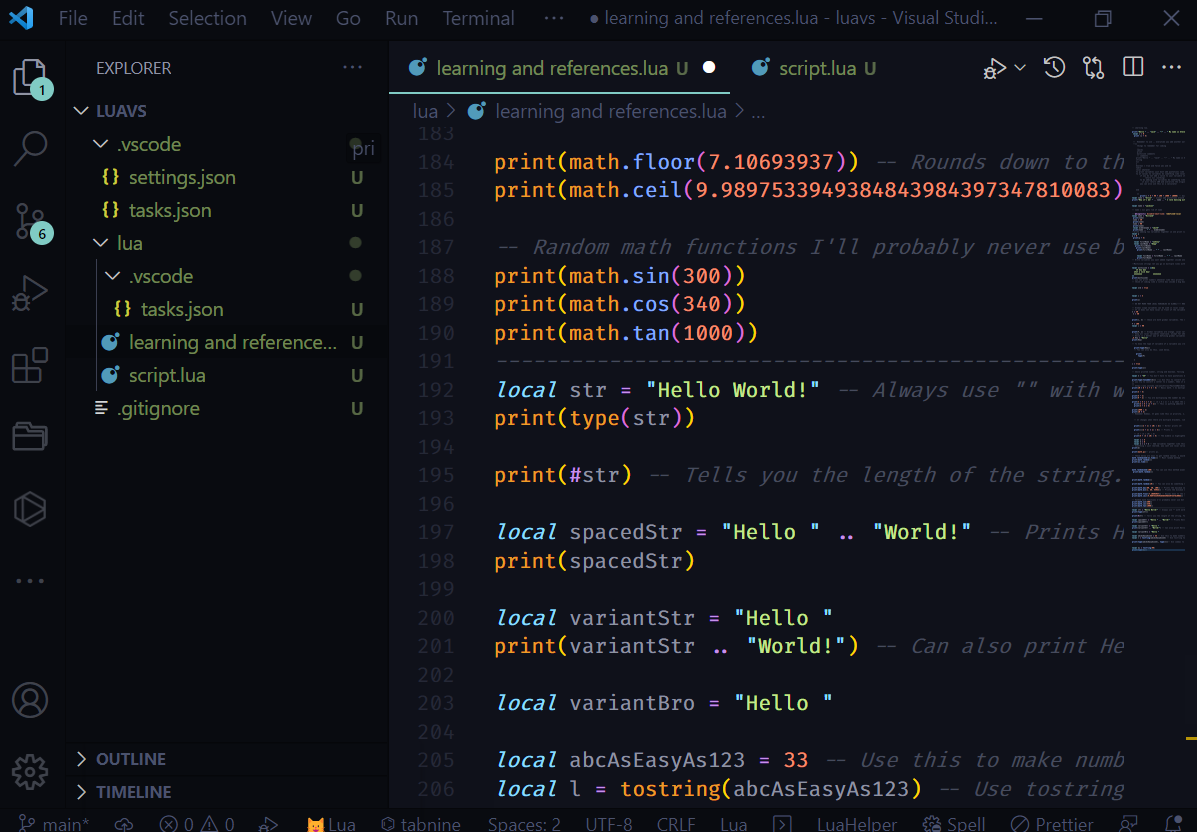
-------------------------------------------------------------------------------------------------------
-- Learning Lua.
print("Hello " .. "Jack" .. "!" .. " My name is Steve.")
local x = 0
print (x + 5)
-- Remember to use .. every time you add another word use these ways to print sentences. Always remember to add spaces at the beginnings of things you want to be spaced from the rest of the text like print("hi john" .. " Hey man!")
--[[
things to remember for coding
..
spaces
print
multiline comments
-- comments
print("Hello " .. "Jack" .. "!" .. " My name is Steve.") for future reference
string
nil
1
boolean = true and false yes and no
table
local whatever
to print variables just dont add quotations like print(ack)
to at values to variables do something like local what = 9
if you do not add a value to your variable it will
return nil (nothing)
to do adding with variables do something like print(arithmetic + 5) (value set at 95 for this example))
it will return 100 and overwrite the original value
you can also use this as a calculator
end
]]
print(x + 5 + 90 + 100 + 1000 + 10000) -- doing .. with this will just make it a completely new equation
local name = "Alvin" -- always add quotations around values
print("Hey it's me! " .. name .. " I love dancing with " .. name .. " Because he's nice.")
local name = "jackson"
-- name = nil gets rid of name
---@diagnostic disable-next-line: redefined-local
local name = "Rilland"
print(name)
name = 30
print(name)
name = 90
print(name)
local middlename = "smith"
print(name .. " " .. middlename)
--write adding two variables together in one print like this.
local p
p = 8
print(p + 4)
local firstName = "Johnny"
local lastName = "Depp"
print(firstName)
print(lastName)
print(firstName .. " " .. lastName)
local fullName = firstName .. " " .. lastName
print(fullName)
-- Write variables you want to be added together inside another variable like this to make it easier to read.
--Multiline strings let you go on multiple lines with a string as seen below.
local multiLine = [[boy
oh boy
what a nice day!
]]
print(multiLine)
-- you can print numbers whenever like this print(1)
-- think of coding like a little box inside a big box
local old = true
local x = 3
print(x)
-- DO NOT MARK YOUR LOCAL VARIABLES AS GLOBAL!!!! READ THIS
-- Global scope variables can be used in local scope but local scope variables cannot be used in the global scope.
-- If it does not have local in front of the variable it is global. If it has local in front it is a local variable! As shown below.
C = 40
C = 50
print(c, C) -- these are both global variables. The lowercase C prints nil because it is not C.
F = 100
local c = 90
print(F, c) -- Global variables are orange. Local variables are gray uppercases and lowercases dont matter but you should always make global variables uppercase for them to be easier to see.
-- Keep all local variables lowercase. except for when their multiword then do this. local legDay = amazing
-- Below is a better way of defining global variables.
_G.Hey = "Hello"
print(Hey)
-- To know the type of variable of the variable you create you can do something like print(type(hey)) as seen below.
print(type(Hey))
-- You can also do this. Look below.
print(
type(F)
)
x = true
print(type(x))
-- Above a printed number, string, and boolean. Telling me what type of variable they were.
local k = "34" -- You don't have to have quotations marks around variables but I suggest it.
print(type(tonumber(k))) --[[ Use this to convert strings to numbers or vice versa.
If you try to convert a letter to a number, then it will return nil.
]]
-- for info. If you
print(10 * 6 + 1 + 3 - 4) -- Basic math. * Is multiplication + is addition. - Is subtraction. The result is 60. Can even work with negative numbers like print(3 - 4) result will be -1. ^ Is to the power of. / Is division. % Is modulo and you should use it if you have something messy like 3.3333333333333 using modulo turns it into 1. Use if you only want integers.
print(3 - 4)
print(4 ^ 3)
print(9 ^ 2) -- You are multiplying the number by itself, and what the number is "to the power of" is how many times you are multiplying it by itself. For example, 2 to the power of 3 is 8. Seriously I have horrible math memory so I need all these notes LOL
print(3 * 5 * 1 + 1) -- (3 x 5 x 1) + 1 Is what the computer is seeing this as. it will always do this in lua. (3 + (3 * 5)
print(3 * 5 * (1 + 1)) -- This is putting additon first. If you want to specify what you want to be added/divided/multiplied first use brackets.
print(3 + 3 * 5)
print(1000 / 2)
print(10 % 3)
-- Remember Bodmas. It goes like this in priority. 1. Brackets of any kind. 2. Orders. 3. Division. 4. Multiplication 5. Addition. 6. Subtraction. in this order if you see any different things in one equation like 2 ^ 1 - 1 you do orders first and so on.
-- It changes when there are multiple brackets. like (((2 + 1) * 10) / 2) to make it easier to read. since addition is closest to the beginning it goes first. Then multiplication. Then division.
print((((2 + 1) * 10) / 2)) -- Works! prints 15!
print((((2 + 1) * 1) / 3)) -- Prints 1.
-- (5 + (3 * 10) / 5)
print(5 + (3 * 10) / 5) -- The middle is highlighted so it will go first. Then division. Then addition.
local a = 5
local b = 8
local m = a + b -- Add variables together like this.
-- Something I just learned. you can global variables across code.
print(m)
print(math.pi) -- prints pi.
-- These below are ways to get random values. I would suggest the os.time method. And the math.random only method is for a onetime use.
math.randomseed(os.time()) -- Most random method.
print(math.random())
print(os.time())
math.randomseed(100) -- You can use this method aswell.
print(math.random())
print(math.random())
print(math.random(10)) -- You can also do something like this. prints between 1 and 10. You can even do something like (10, 50) and it would do between 10 and 50.
print(math.max(80, 30, 100)) -- Prints the maximum value.
print(math.min(1, 80, 54933)) -- Prints the minimum value.
print(math.floor(7.10693937)) -- Rounds down to the value at the beginning results in 7.
print(math.ceil(9.9897533949384843984397347810083)) -- Rounds the beginning value up by 1 will result in 10.
-- Random math functions I'll probably never use but It's there.
print(math.sin(300))
print(math.cos(340))
print(math.tan(1000))
------------------------------------------------------------------------------------------------
local str = "Hello World!" -- Always use " " with words that are meant to talk.
print(type(str))
print(#str) -- Tells you the length of the string. You can also put it in front of a string to get Its length like this. #"Hello World!"
local spacedStr = "Hello " .. "World!" -- Prints Hello World! with variables.
print(spacedStr)
local variantStr = "Hello "
print(variantStr .. "World!") -- Can also print Hello World! like this.
local variantJuan = "Hello "
local abcAsEasyAs123 = 33 -- Use this to make numbers that you want printed strings.
local l = tostring(abcAsEasyAs123) -- Use tostring to convert things/numbers to strings as seen. You can even use tonumber. Can also use this like local x = tostring(22) so you don't even need to use the second line. As seen below.
print(type(abcAsEasyAs123), type(l))-- Use commas to seperate multiple things you want in a line like this. (13, 14)
local mj = tostring(90)
print(type(mj))
-------------------------------------------------------------------------------------------------------
-- Learning Lua.
print("Hello " .. "Jack" .. "!" .. " My name is Steve.")
local x = 0
print (x + 5)
-- Remember to use .. every time you add another word use these ways to print sentences. Always remember to add spaces at the beginnings of things you want to be spaced from the rest of the text like print("hi john" .. " Hey man!")
--[[
things to remember for coding
..
spaces
multiline comments
-- comments
print("Hello " .. "Jack" .. "!" .. " My name is Steve.") for future reference
string
nil
1
boolean = true and false yes and no
table
local whatever
to print variables just dont add quotations like print(ack)
to at values to variables do something like local what = 9
if you do not add a value to your variable it will
return nil (nothing)
to do adding with variables do something like print(arithmetic + 5) (value set at 95 for this example))
it will return 100 and overwrite the original value
you can also use this as a calculator
end
]]
print(x + 5 + 90 + 100 + 1000 + 10000) -- doing .. with this will just make it a completely new equation
local name = "Alvin" -- always add quotations around values
print("Hey it's me! " .. name .. " I love dancing with " .. name .. " Because he's nice.")
local name = "jackson"
-- name = nil gets rid of name
---@diagnostic disable-next-line: redefined-local
local name = "Rilland"
print(name)
name = 30
print(name)
name = 90
print(name)
local middlename = "smith"
print(name .. " " .. middlename)
--write adding two variables together in one print like this.
local p
p = 8
print(p + 4)
local firstName = "Johnny"
local lastName = "Depp"
print(firstName)
print(lastName)
print(firstName .. " " .. lastName)
local fullName = firstName .. " " .. lastName
print(fullName)
-- Write variables you want to be added together inside another variable like this to make it easier to read.
--Multiline strings let you go on multiple lines with a string as seen below.
local multiLine = [[boy
oh boy
what a nice day!
]]
print(multiLine)
-- you can print numbers whenever like this print(1)
-- think of coding like a little box inside a big box
local old = true
local x = 3
print(x)
-- DO NOT MARK YOUR LOCAL VARIABLES AS GLOBAL!!!! READ THIS
-- Global scope variables can be used in local scope but local scope variables cannot be used in the global scope.
-- If it does not have local in front of the variable it is global. If it has local in front it is a local variable! As shown below.
C = 40
C = 50
print(c, C) -- these are both global variables. The lowercase C prints nil because it is not C.
F = 100
local c = 90
print(F, c) -- Global variables are orange. Local variables are gray uppercases and lowercases dont matter but you should always make global variables uppercase for them to be easier to see.
-- Keep all local variables lowercase. except for when their multiword then do this. local legDay = amazing
-- Below is a better way of defining global variables.
_G.Hey = "Hello"
print(Hey)
-- To know the type of variable of the variable you create you can do something like print(type(hey)) as seen below.
print(type(Hey))
-- You can also do this. Look below.
print(
type(F)
)
x = true
print(type(x))
-- Above a printed number, string, and boolean. Telling me what type of variable they were.
local k = "34" -- You don't have to have quotations marks around variables but I suggest it.
print(type(tonumber(k))) --[[ Use this to convert strings to numbers or vice versa.
If you try to convert a letter to a number, then it will return nil.
]]
-- for info. If you
print(10 * 6 + 1 + 3 - 4) -- Basic math. * Is multiplication + is addition. - Is subtraction. The result is 60. Can even work with negative numbers like print(3 - 4) result will be -1. ^ Is to the power of. / Is division. % Is modulo and you should use it if you have something messy like 3.3333333333333 using modulo turns it into 1. Use if you only want integers.
print(3 - 4)
print(4 ^ 3)
print(9 ^ 2) -- You are multiplying the number by itself, and what the number is "to the power of" is how many times you are multiplying it by itself. For example, 2 to the power of 3 is 8. Seriously I have horrible math memory so I need all these notes LOL
print(3 * 5 * 1 + 1) -- (3 x 5 x 1) + 1 Is what the computer is seeing this as. it will always do this in lua. (3 + (3 * 5)
print(3 * 5 * (1 + 1)) -- This is putting additon first. If you want to specify what you want to be added/divided/multiplied first use brackets.
print(3 + 3 * 5)
print(1000 / 2)
print(10 % 3)
-- Remember Bodmas. It goes like this in priority. 1. Brackets of any kind. 2. Orders. 3. Division. 4. Multiplication 5. Addition. 6. Subtraction. in this order if you see any different things in one equation like 2 ^ 1 - 1 you do orders first and so on.
-- It changes when there are multiple brackets. like (((2 + 1) * 10) / 2) to make it easier to read. since addition is closest to the beginning it goes first. Then multiplication. Then division.
print((((2 + 1) * 10) / 2)) -- Works! prints 15!
print((((2 + 1) * 1) / 3)) -- Prints 1.
-- (5 + (3 * 10) / 5)
print(5 + (3 * 10) / 5) -- The middle is highlighted so it will go first. Then division. Then addition.
local a = 5
local b = 8
local m = a + b -- Add variables together like this.
-- Something I just learned. you can global variables across code.
print(m)
print(math.pi) -- prints pi.
-- These below are ways to get random values. I would suggest the os.time method. And the math.random only method is for a onetime use.
math.randomseed(os.time()) -- Most random method.
print(math.random())
print(os.time())
math.randomseed(100) -- You can use this method aswell.
print(math.random())
print(math.random())
print(math.random(10)) -- You can also do something like this. prints between 1 and 10. You can even do something like (10, 50) and it would do between 10 and 50.
print(math.max(80, 30, 100)) -- Prints the maximum value.
print(math.min(1, 80, 54933)) -- Prints the minimum value.
print(math.floor(7.10693937)) -- Rounds down to the value at the beginning results in 7.
print(math.ceil(9.9897533949384843984397347810083)) -- Rounds the beginning value up by 1 will result in 10.
-- Random math functions I'll probably never use but It's there.
print(math.sin(300))
print(math.cos(340))
print(math.tan(1000))
------------------------------------------------------------------------------------------------
local str = "Hello World!" -- Always use " " with words that are meant to talk.
print(type(str))
print(#str) -- Tells you the length of the string. You can also put it in front of a string to get Its length like this. #"Hello World!"
local spacedStr = "Hello " .. "World!" -- Prints Hello World! with variables.
print(spacedStr)
local variantStr = "Hello "
print(variantStr .. "World!") -- Can also print Hello World! like this.
local variantJuan = "Hello "
local abcAsEasyAs123 = 33 -- Use this to make numbers that you want printed strings.
local l = tostring(abcAsEasyAs123) -- Use tostring to convert things/numbers to strings as seen. You can even use tonumber. Can also use this like local x = tostring(22) so you don't even need to use the second line. As seen below.
print(type(abcAsEasyAs123), type(l))-- Use commas to seperate multiple things you want in a line like this. (13, 14)
local mj = tostring(90)
print(type(mj))