Lil.gas909
New Member
- Apr 15, 2020
- 4
- 1

Follow along with the video below to see how to install our site as a web app on your home screen.
Note: This feature may not be available in some browsers.

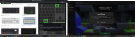
@Lil.gas909 We don't yet support any versions lower than 1.14.4, please update your game and that crash won't happen anymore.I can't seems to join the server every time I try to join my game crashes and gives me this error code I have made sure to use the correct installation

it would be better if you used bedrock edition, if you purchased java edition before 2018 oct (something) you can get bedrock edition for free as a gift (it will be in the gift section)I can't seems to join the server every time I try to join my game crashes and gives me this error code I have made sure to use the correct installation
and yea it doesn't support your version just update it to the latest version which java updated it inI can't seems to join the server every time I try to join my game crashes and gives me this error code I have made sure to use the correct installation
You’re welcome lolThis is not brokenlens problem and thank you for the tip finally I can screenshot my windows10
Where would I find that cause I’ve owned java since like 2015it would be better if you used bedrock edition, if you purchased java edition before 2018 oct (something) you can get bedrock edition for free as a gift (it will be in the gift section)

I can't seems to join the server every time I try to join my game crashes and gives me this error code I have made sure to use the correct installation
or just prt.scThis is not brokenlens problem and thank you for the tip finally I can screenshot my windows10
you can go to minecaft.net > sign in> then go to your profile info and you'll see - edit/remove info or something, click it then > login in that area > and then you'll see a gift code redeem thing > and click redeem -(you might not have it im not so sure if you do.Where would I find that cause I’ve owned java since like 2015