
Issue on Discord

Theodorkkk

Member
Joined
May 4, 2019
Messages
39
Reaction score
37
So, I was randomly checking each section and I found out that there's an official BrokenLens Discord so I decided to join, I tapped the link provided after I created my Discord account so it will lead me to the exact Discord Server.

However, when I tapped it, it needs verification. You need to go through the server to get a PIN, I did the thing but when I tried to type my pin it shows this :

IMG_20190505_202651.JPG
IMG_20190505_202712.JPG


Is there a way so I could fix my problem? I am new to this, and don't have that much experience.
 
So, I was randomly checking each section and I found out that there's an official BrokenLens Discord so I decided to join, I tapped the link provided after I created my Discord account so it will lead me to the exact Discord Server.

However, when I tapped it, it needs verification. You need to go through the server to get a PIN, I did the thing but when I tried to type my pin it shows this :
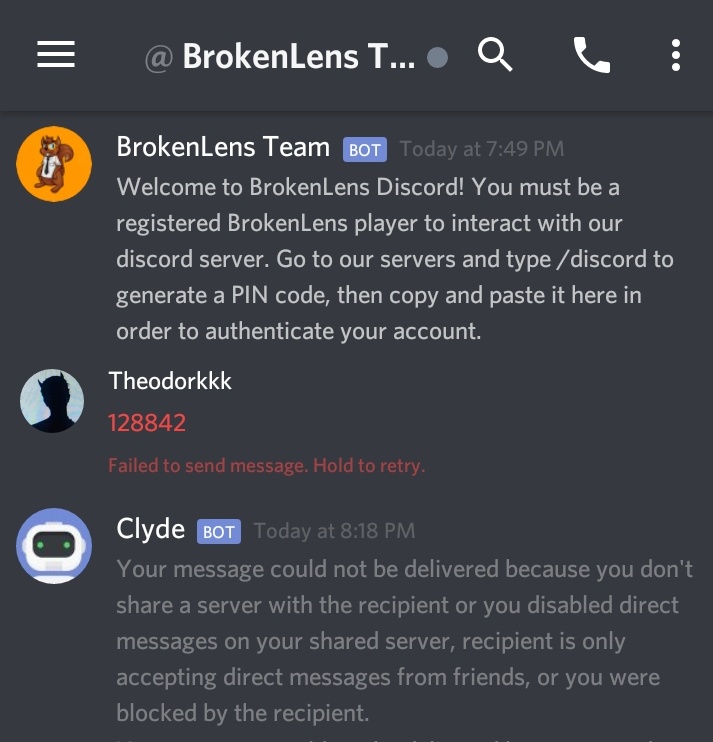
View attachment 172753 View attachment 172754

Is there a way so I could fix my problem? I am new to this, and don't have that much experience.
You should go to the server then type it
View reply.
 
Join the discord server again, our invite link is configured to kick users without roles when they go offline. You can only message the bot if you are in the same server.
View reply.
 
Join the discord server again, our invite link is configured to kick users without roles when they go offline. You can only message the bot if you are in the same server.
I'm 100 percently confused.

I tried the same thing, and I stay up on the server until I wrote the PIN. But still my problem hasn't been solved yet.

I clicked the Discord Link again and it says :
IMG_20190506_082107.JPG
View reply.
 
Join the discord server again using the invite link and don't go offline from discord. The discord server will kick you from the *discord server* once you go offline if you don't have any roles set (you are not authenticated). And the bot only accepts messages from users who are in the *discord server*.
View reply.
 
So, I was randomly checking each section and I found out that there's an official BrokenLens Discord so I decided to join, I tapped the link provided after I created my Discord account so it will lead me to the exact Discord Server.

However, when I tapped it, it needs verification. You need to go through the server to get a PIN, I did the thing but when I tried to type my pin it shows this :
View attachment 172753 View attachment 172754

Is there a way so I could fix my problem? I am new to this, and don't have that much experience.
I used to have this problem. I managed to solve it by going on Discord with one device and going on Minecraft in another.
View reply.
 
Join the discord server again using the invite link and don't go offline from discord. The discord server will kick you from the *discord server* once you go offline if you don't have any roles set (you are not authenticated). And the bot only accepts messages from users who are in the *discord server*.
I'm gonna try that again, hoping it will work now.
View reply.
 

Users Who Are Viewing This Thread (Total: 0, Members: 0, Guests: 0)

Back
Top