

- Jul 4, 2018
- 468
- 29,931
So I've been playing BrokenLens since later 2017 ( i left for a year but whatever) and that entire time, I played on PE
Before I left, my iPad, when I came back, my iPhone
All I wanted was to be like the PC players, with their jumpbridging and spam clicking.
And then I found out, that you can, in fact, connect an xbox controller to your phone or ipad, via bluetooth
So I thought I would help some other people in doing it
What you will need:
iPad (at least iOS 3.0)/ iPhone (6S and above)
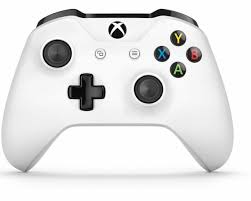
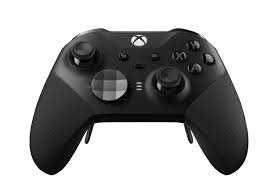
Xbox One S controller/ Elite series 2 controller
Stable internet connection
How to do it:
1. Turn on your phone or ipad, and go into settings.
2. Click on the bluetooth tab, and turn it on and off to reset it.
3. Turn on your xbox controller, and press the little button on top
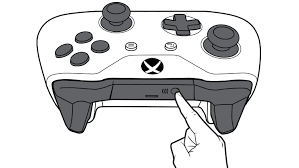
4. Hold the button
5. In your bluetooth tab, 'Xbox Wireless Controller' should pop up as a device to pair with.
6. Click on 'Xbox Wireless Controller'
7. It is now connected!
8. Go onto any game that is compatible with a controller (Minecraft, Fortnite, etc)
Tips
Now that you are controller, you might want to learn godbridging/speedbridging/breezily
Be aware that this does take practice to get the hang of it
First, you need to change your controls.
Go into the Minecraft app on your device and press 'settings'
There should be a tab that says 'Controller'
Change (x) button to 'sprint'
Change (a) button to 'jump/fly up'
Change (b) button to 'sneak/fly down'
Change (LT) button to 'place block'
FOV:
FOV should be either
- 85
- 98
- 110
Whatever is more comfortable for you
(For pvp, be sure to change your sensitivity)
Now to bridging
1. Open a new world (Creative/Superflat)
2. Get some blocks, and build a little nerdpole
3. Look slightly infront of the block you are on
4. Push your left joystick forward (to move), hold LT (to build) and pull your right joystick down (to look down), all at the same time
5. Now, you should be walking, while placing blocks below you
6. For sprint bridging, simply continue the bridge you are making, and then press (x) (sprint)
7. For jumpbridging, continue the bridge you are making, press (x) to sprint (this will lock it until you stop moving) and then hold (a). This will make you auto jump
And there you have it! Jumpbridging on controller
I hope this helps! <33
Please reply with any questions
Again, keep in mind you need to practice a lot.
Before I left, my iPad, when I came back, my iPhone
All I wanted was to be like the PC players, with their jumpbridging and spam clicking.
And then I found out, that you can, in fact, connect an xbox controller to your phone or ipad, via bluetooth
So I thought I would help some other people in doing it
What you will need:
iPad (at least iOS 3.0)/ iPhone (6S and above)
Xbox One S controller/ Elite series 2 controller
Stable internet connection
How to do it:
1. Turn on your phone or ipad, and go into settings.
2. Click on the bluetooth tab, and turn it on and off to reset it.
3. Turn on your xbox controller, and press the little button on top
4. Hold the button
5. In your bluetooth tab, 'Xbox Wireless Controller' should pop up as a device to pair with.
6. Click on 'Xbox Wireless Controller'
7. It is now connected!
8. Go onto any game that is compatible with a controller (Minecraft, Fortnite, etc)
Tips
Now that you are controller, you might want to learn godbridging/speedbridging/breezily
Be aware that this does take practice to get the hang of it
First, you need to change your controls.
Go into the Minecraft app on your device and press 'settings'
There should be a tab that says 'Controller'
Change (x) button to 'sprint'
Change (a) button to 'jump/fly up'
Change (b) button to 'sneak/fly down'
Change (LT) button to 'place block'
FOV:
FOV should be either
- 85
- 98
- 110
Whatever is more comfortable for you
(For pvp, be sure to change your sensitivity)
Now to bridging
1. Open a new world (Creative/Superflat)
2. Get some blocks, and build a little nerdpole
3. Look slightly infront of the block you are on
4. Push your left joystick forward (to move), hold LT (to build) and pull your right joystick down (to look down), all at the same time
5. Now, you should be walking, while placing blocks below you
6. For sprint bridging, simply continue the bridge you are making, and then press (x) (sprint)
7. For jumpbridging, continue the bridge you are making, press (x) to sprint (this will lock it until you stop moving) and then hold (a). This will make you auto jump
And there you have it! Jumpbridging on controller
I hope this helps! <33
Please reply with any questions
Again, keep in mind you need to practice a lot.
Last edited:


