

- Nov 26, 2017
- 1,567
- 22,639
〷 What are HD Skins? 〷
BEFORE:AFTER:
HD skins are more pix-elated than skins you would find that are normally 64x64 but for this to work it needs to be 128x128
〷 Steps to making it after you download Medibang 〷
✂ Open your file
File > Open
✂ Select your skin you want to edit
(Has to be .png files but .jpg files are fine)
✂Click Edit
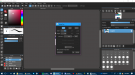
Once you have selected your desired skin click edit and you will see "Image Size"
✂ Width x Height
Change width x height, to 128 x 128 (px)
✂ Edit it!
For this I just chose to keep it simple and edit the eyes, which is totally optional.
✂ Finished editing!
When you're finished editing your skin you want to make sure you save all your progress
File > Save (Suggested)
File > Save As
Save it to transparent PNG.
*Don't use the other 2 below it because it will not work.*
✂ Open your skin
Open your skin file from wherever you saved it and have fun!
✂ The app I use to make it
https://medibangpaint.com/en/app-download/
Direct Downloads
(IMPORTANT: I assure you WON'T get a virus or ANY malware when you download this because I've been using the application for several weeks and everything WORKS FINE.)
Works for Minecraft Versions 1.2.3+
☞ Windows
64bit - https://download.medibang.com/download/MediBangPaintPro/MediBangPaintProSetup-17.0-64bit.exe
32bit - https://download.medibang.com/download/MediBangPaintPro/MediBangPaintProSetup-17.0-32bit.exe
☞ MAC
- https://download.medibang.com/download/MediBangPaintPro/MediBangPaintPro-17.0.dmg
EDIT: Okay so desktop is the only way I found to edit the skin, so I deleted ipad, iphone, and android links. Also anyone is always free to ask me to edit their skin for them <3
Discord: Ashleyy#0001 or msg me start a convo w/ me!
Attachments
Last edited:


