

- Jul 10, 2016
- 9,787
- 57,336
Welcome on the BrokenLens forum!
If you're looking for the BrokenLens store, where ranks and other merchandise are available, http://shop.brokenlens.xyz
To create a forum account, you can simply click on the login button on top of the page.

After that, simply select "No, create an account now" and "Sign up"

After filling out basic information, like your forum name, email, and password, as well as a small verification that you're human, you will be directed to this message:

You now simply have to login in your email to confirm your account, and the inscription will be done.
After that, simply select "No, create an account now" and "Sign up"
After filling out basic information, like your forum name, email, and password, as well as a small verification that you're human, you will be directed to this message:
You now simply have to login in your email to confirm your account, and the inscription will be done.
There are multiple ways to personalize your account, start by clicking on your name on top, and select one of these options.

The first option called "Personal Details" will allow you to use multiple customization tools, such as setting your status, your avatar, your gender, the display of your date of birth, or your avatar background if you bought a rank, and a few more details about you, if you wish to share them of course.
The second option called "Signature" will allow you to customize your signature. It's what will appear under all of your posts on the forum, hence the name signature. Don't forget that there is 250 pixel limit.
The third option called "Contact Details" will allow you to modify the email linked to your account, your messaging preferences, and online identities.
The fourth option called "Privacy" will allow you to personalize the privacy of your account, such as who can view your profile or post on it, as well as many more options.
The fifth option called "Preferences" will allow you to set your timezone and modify other browsing preferences.
The sixth option called "Alert Preferences" allows you to customize what will send you an alert or not.
The first option called "Personal Details" will allow you to use multiple customization tools, such as setting your status, your avatar, your gender, the display of your date of birth, or your avatar background if you bought a rank, and a few more details about you, if you wish to share them of course.
The second option called "Signature" will allow you to customize your signature. It's what will appear under all of your posts on the forum, hence the name signature. Don't forget that there is 250 pixel limit.
The third option called "Contact Details" will allow you to modify the email linked to your account, your messaging preferences, and online identities.
The fourth option called "Privacy" will allow you to personalize the privacy of your account, such as who can view your profile or post on it, as well as many more options.
The fifth option called "Preferences" will allow you to set your timezone and modify other browsing preferences.
The sixth option called "Alert Preferences" allows you to customize what will send you an alert or not.
You can start to view other content, just click on forum button to be sent to the main forum page, you can also http://brokenlens.xyz/forums/index.php . Multiple sections are available to you, but if you just want to see what's new, you can always click on the "New Post" button to find what's recently active.
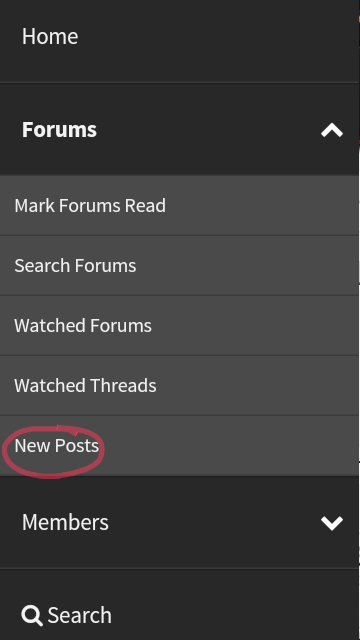
Whatever you choose to do, you will be able to not only view the content of others, but also interact with it.
Whatever you choose to do, you will be able to not only view the content of others, but also interact with it.
Once you click on a thread, you will notice a bunch of options other than just reading it.
One of the first things you can do is to simply reply to the thread, and to do that you can simply use the box under the page to write your reply.
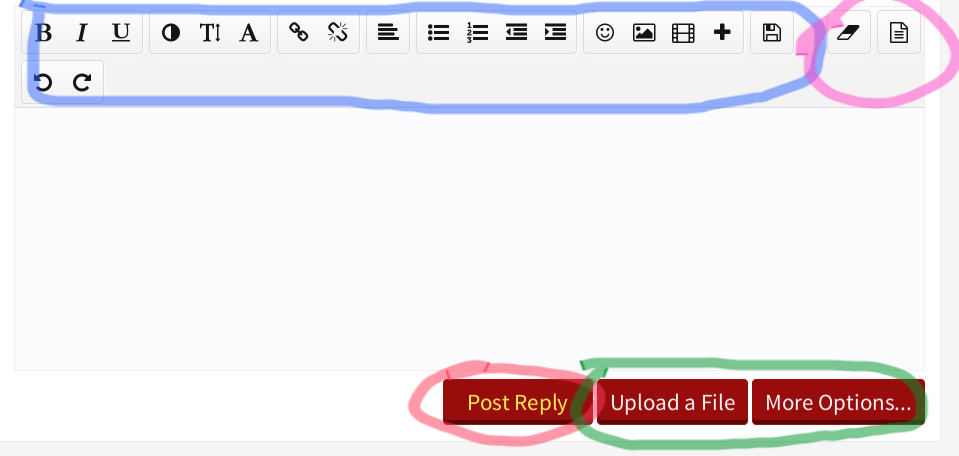
The Blue part is multiple tools you can use to modify the appearance of your text, format it, add image or video to it, and many other functions.
The Purple part on the top right is some advance function, used to edit the BB code.
The Green part is used to upload file, or obtain more option by opening another page to reply.
The red part is the button to post once you finished your reply.
Remember you can always use the Edit button under your post if you want to change something later.

Under other member post you will find a place where you can interact with the content they sent themselves.
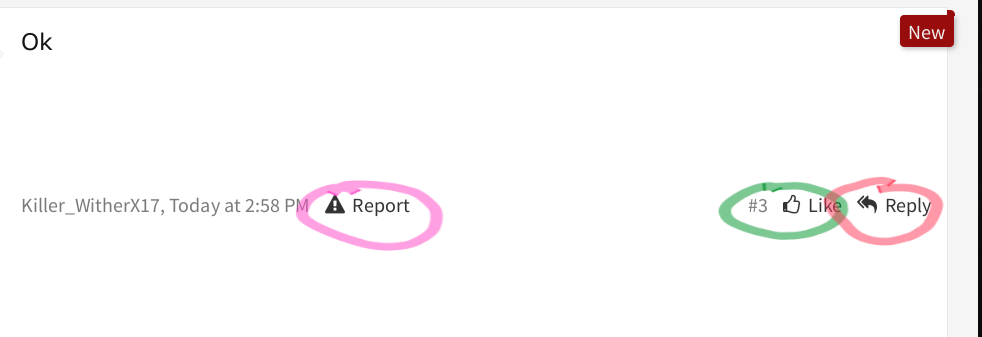 The Report button is used in case the post breaks the BrokenLens rules, if you stumble upon toxic content make sure to report it. Advertisement, insult, or public shaming are examples of what you should report.
The Red box contain Reply button. Pressing the reply button will send a quote of the person reply, so you can be precise about who you're talking to when writing your reply.For more information, consult the rules, or read the spoiler bellow that explain it fully.
The Green Box is the number of ratings that the user received on his post. The like button allow you to see a who rated this post.
One of the first things you can do is to simply reply to the thread, and to do that you can simply use the box under the page to write your reply.
The Blue part is multiple tools you can use to modify the appearance of your text, format it, add image or video to it, and many other functions.
The Purple part on the top right is some advance function, used to edit the BB code.
The Green part is used to upload file, or obtain more option by opening another page to reply.
The red part is the button to post once you finished your reply.
Remember you can always use the Edit button under your post if you want to change something later.
Under other member post you will find a place where you can interact with the content they sent themselves.
The Red box contain Reply button. Pressing the reply button will send a quote of the person reply, so you can be precise about who you're talking to when writing your reply.For more information, consult the rules, or read the spoiler bellow that explain it fully.
The Green Box is the number of ratings that the user received on his post. The like button allow you to see a who rated this post.
If the content you came across breaks the BrokenLens rules, it's always better to report them.
Content that breaks rules can come in many forms:
•Content that breaks the RAU (Respect All Users)
Such as being rude, aggressive, or offensive. This include words, image, and media. This also include flame wars, thread that turn into a debate of insults and hatred.
•Content that breaks the security rules
Such as advertisement, scamming, sketchy links, unapproved giveaway (requires screenshot of admin approval), or spambot.
•Content that need moderator actions
Such as if someone would want their thread deleted, or thread that are in the wrong section, and need to be moved to the right section. Ban appeals or reports are common thing to see in the wrong section due to users mistake.
To report a thread, or a post, simply use the report button under the post:
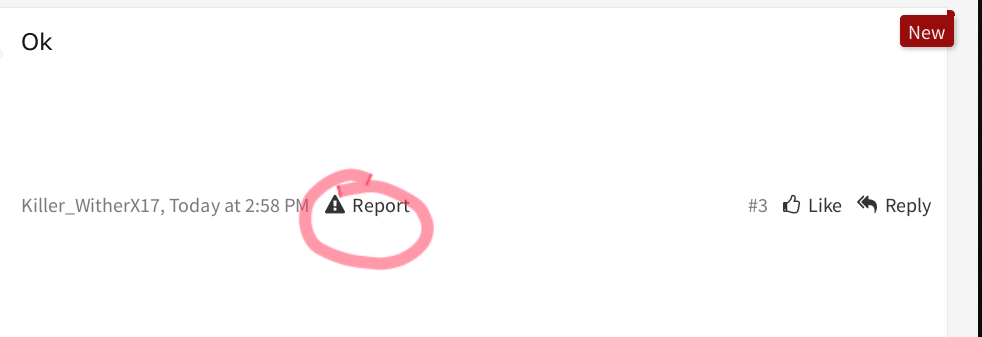
To report a profile post, simply press the report button that's directly under it:

Once you press the report button, a box will open. Include a short description, and press Report Post.
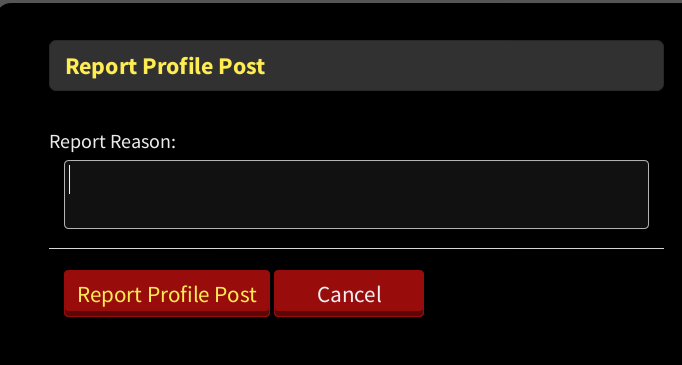
Your report will be handled by a moderator shortly after.
Content that breaks rules can come in many forms:
•Content that breaks the RAU (Respect All Users)
Such as being rude, aggressive, or offensive. This include words, image, and media. This also include flame wars, thread that turn into a debate of insults and hatred.
•Content that breaks the security rules
Such as advertisement, scamming, sketchy links, unapproved giveaway (requires screenshot of admin approval), or spambot.
•Content that need moderator actions
Such as if someone would want their thread deleted, or thread that are in the wrong section, and need to be moved to the right section. Ban appeals or reports are common thing to see in the wrong section due to users mistake.
To report a thread, or a post, simply use the report button under the post:
To report a profile post, simply press the report button that's directly under it:
Once you press the report button, a box will open. Include a short description, and press Report Post.
Your report will be handled by a moderator shortly after.
You can also create your own thread, that other users will be able to view.
First of all, select http://brokenlens.xyz/forums/index.php . Is your thread a general discussion about BrokenLens, more related to one game, perhaps it's off topic or a Minecraft? Scroll trough the multiple sections, and find the appropriate one.
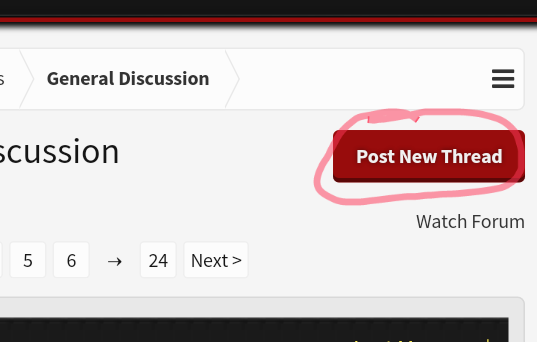
Once you clicked on the section, you will find, near the top right corner, this button.
By clicking on it you will start creating your own thread.
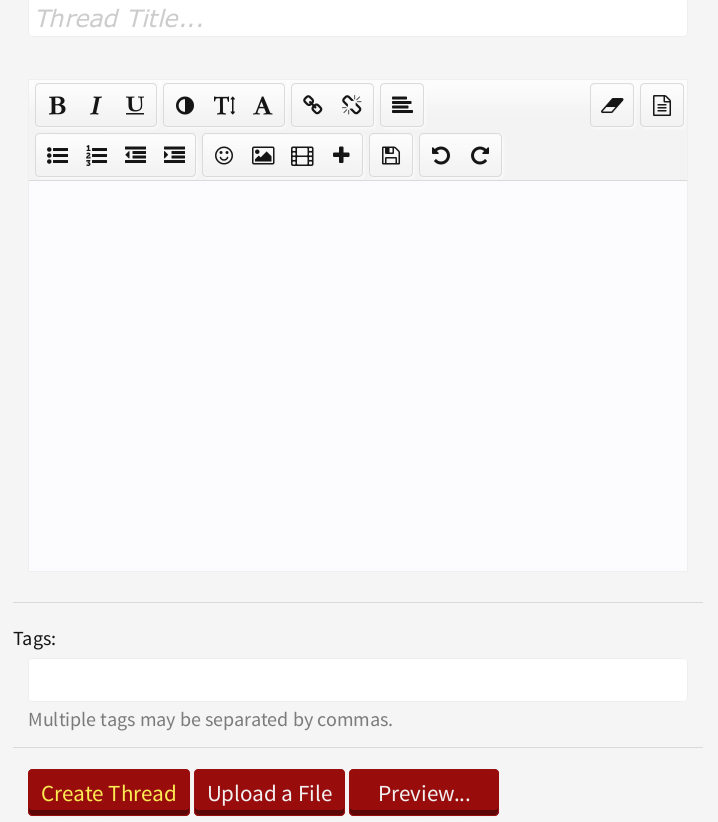 As you can see, creating a thread is similar to making a reply. The only real difference is that you need to create a title, as show above. The tools are the same, and you can customize your work in the same way as a reply. If you want to learn more about advanced functions, read the BB Codes help - http://brokenlens.xyz/forums/index.php?help/bb-codes
You can write your thread in here, It's recommended to try to keep decent grammar, and respect rules by being polite and calm. Following the rules and making your content look nicer will always allow you to be noticed more, and respected.

You can also add a Poll with various answers, and customize it in many ways. It's another great way to get people opinions quickly.
Once you're done with all of it, press Create Thread to send your thread on the public.
Don't forget that you can edit your thread using the Edit button even after you created it.
First of all, select http://brokenlens.xyz/forums/index.php . Is your thread a general discussion about BrokenLens, more related to one game, perhaps it's off topic or a Minecraft? Scroll trough the multiple sections, and find the appropriate one.
Once you clicked on the section, you will find, near the top right corner, this button.
By clicking on it you will start creating your own thread.
You can write your thread in here, It's recommended to try to keep decent grammar, and respect rules by being polite and calm. Following the rules and making your content look nicer will always allow you to be noticed more, and respected.
You can also add a Poll with various answers, and customize it in many ways. It's another great way to get people opinions quickly.
Once you're done with all of it, press Create Thread to send your thread on the public.
Don't forget that you can edit your thread using the Edit button even after you created it.
The forum has it own rank system based on your activity, as you earn Trophies, your rank will change.
New Member: It's the basic rank. Obtained when joining.
Member: It requires 5 trophy points. Obtained at 30 messages.
Active Member: It requires 20 trophy points. Obtained at 60 messages.
Notable Member: It requires 45 trophy points.Obtained at 160 messages.
New Member: It's the basic rank. Obtained when joining.
Member: It requires 5 trophy points. Obtained at 30 messages.
Active Member: It requires 20 trophy points. Obtained at 60 messages.
Notable Member: It requires 45 trophy points.Obtained at 160 messages.
Home: The home section will show you the most recent updates, and what big announcement has been made by Administrators and Developers.
Forums: The forum section is explained throughout this entire thread, quite honestly.

Enjoy your stay on our forum!

Thanks for reading this!
~Spike <3
Last edited:


